

Description
Chrome-Torrent Integration for Transmission
Overview
The software is designed to seamlessly connect the Transmission BitTorrent client with the Chrome browser, enabling users to manage torrent downloads directly from their web browser. This integration allows for a streamlined workflow by eliminating the need to switch between applications when adding or managing torrents. The primary purpose is to enhance user efficiency, particularly for those who frequently download content via magnet links or .torrent files while browsing.
Target users include individuals managing large volumes of torrent downloads, digital content curators, and tech-savvy users who rely on Transmission as their preferred BitTorrent client. The tool is especially useful for those who engage with private trackers, as it supports private torrent files and includes an option to handle .torrent file downloads directly through the extension.
Real-world usage scenarios include quickly adding torrents from forums, downloading media files via magnet links during research, or organizing download queues without opening the Transmission interface. The developer did not provide additional background information, and the tool operates as a browser extension with no standalone desktop application component.
Key Features & Capabilities
- Right-click integration – Users can add any link to Transmission with a single right-click, including magnet links and .torrent files.
- Private tracker support – The extension now includes functionality to handle private torrent files and trackers, with a dedicated option in the settings page.
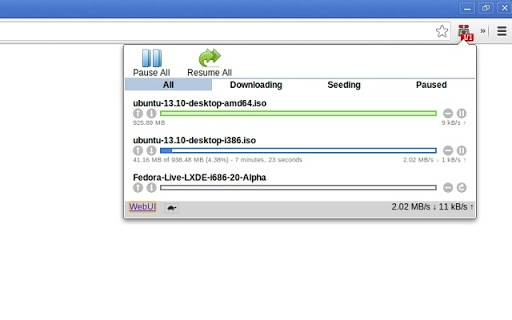
- Integrated web UI access – A built-in interface within Chrome allows users to view all active torrents, categorized into downloading, seeding, paused, and all.
- Queue management – Users can pause, remove, or reorder individual torrents within the queue, as well as manage multiple torrents at once.
- Turtle mode control – Toggle turtle mode on or off directly from the Chrome interface to limit bandwidth usage.
- Quick access to Transmission web interface – A direct link to the built-in Transmission web UI is provided for advanced settings and monitoring.
- Error handling – The extension displays an error page if it fails to communicate with the Transmission RPC server, improving troubleshooting visibility.
These features are particularly beneficial for users who prefer minimal context switching. For example, a user browsing a torrent site can right-click a magnet link and instantly initiate the download without leaving Chrome. Similarly, managing a queue during a long download session becomes more efficient with group pause and reorder options.
User Interface, Workflow & Performance
The user interface is embedded directly within the Chrome browser, leveraging the browser’s native UI components. Navigation is intuitive, relying on right-click context menus and a compact overlay panel that displays torrent status and controls. The design prioritizes minimalism, ensuring the extension does not disrupt the browsing experience.
Workflow efficiency is enhanced by direct integration—adding a torrent, checking status, or adjusting settings all occur within the browser environment. The extension uses Chrome’s notification API for alerts, replacing deprecated webkit notifications, which ensures compatibility with current Chrome versions.
Performance details were not specified by the developer. However, based on general behavior of lightweight browser extensions, resource usage is expected to be low. The extension does not appear to run background processes outside of Chrome, and its impact on CPU or RAM usage is likely negligible. Stability is maintained through error handling and versioned RPC communication checks.
Compatibility & System Requirements
The software is compatible with Windows, Mac, and Linux operating systems, making it accessible to a broad user base. It functions as a Chrome extension and requires the Chrome browser to operate. The installation size is 1.2 MB, indicating a lightweight footprint.
Exact system requirements were not listed. The developer did not specify minimum hardware or software prerequisites beyond the supported OS platforms. Compatibility with Transmission is dependent on the client being properly configured with the web interface enabled and the correct RPC and WebUI addresses set in the Transmission settings.
Pros and Cons
Pros
- Seamless right-click integration with Chrome for instant torrent addition
- Support for private trackers and .torrent file handling via options page
- Compact, non-intrusive UI embedded in the browser
- Efficient queue management with group actions and reordering
- Lightweight at 1.2 MB with minimal system impact
- Direct access to Transmission’s web interface from the extension
Cons
- Requires manual configuration of Transmission RPC and WebUI addresses
- Dependent on the Transmission client being properly set up and running
- No built-in torrent file downloader within the extension (external handling required)
- Interface limited to Chrome browser only, no cross-browser support
- Setup process may be challenging for less technical users
FAQ Section
Is this extension compatible with all versions of Transmission?
The extension works with Transmission clients that have the web interface enabled and are configured with valid RPC and WebUI addresses. Compatibility depends on the Transmission version being used, but the extension supports RPC communication from version 1.0.0 onward.
Does the extension require an internet connection to function?
Yes, the extension requires an active connection to the Transmission client, which must be running locally or on a networked device. The extension communicates with the Transmission RPC server, so a working network connection to the client is necessary.
Can I use this extension without installing Transmission?
No, the extension is designed to work exclusively with the Transmission BitTorrent client. It cannot function independently and requires Transmission to be installed and properly configured on the system.
Is the extension safe to use?
As a Chrome extension, it operates within the browser’s security sandbox. It only communicates with the Transmission client on the local machine or network. Users should ensure they download the extension from official sources and verify its authenticity.
Does the extension support offline torrent management?
Management actions such as pausing or removing torrents can be performed while offline, but adding new torrents requires the Transmission client to be running and accessible. The extension cannot initiate downloads without an active connection to the Transmission instance.
Final Thoughts
Chrome-Torrent Integration for Transmission delivers a focused, efficient solution for users who rely on both Chrome and Transmission. Its right-click functionality, support for private trackers, and clean interface significantly reduce workflow friction. While setup requires some initial configuration, the benefits for active torrent users are substantial.
This tool is ideal for power users, content managers, and individuals who value seamless browser-client integration. The lightweight design and minimal system impact make it suitable for long-term use across multiple devices.
Download Chrome-Torrent Integration for Transmission now
Guides & Tutorials for torrent to Transmission Extension for Chrome
How to install torrent to Transmission Extension for Chrome
- Click the Preview / Download button above.
- Once redirected, accept the terms and click Install.
- Wait for the torrent to Transmission Extension for Chrome download to finish on your device.
How to use torrent to Transmission Extension for Chrome
This software is primarily used for its core features described above. Open the app after installation to explore its capabilities.
User Reviews for torrent to Transmission Extension for Chrome 0
No reviews found





